Remove Background of Icon on Windows Taskbar
-
It is annoying that when Simplenote is pinned to the taskbar, it will have a square background of the Windows accent color. Is it possible to remove this background?
Strangely, the background only appears in light mode but not dark mode.
-
Thank you for pointing this out! Indeed, we’re aware of this issue, so I’m going to include your report in our review process. Thanks again for bringing this up!
-

Yes, I’d like to see that annoyance of my accent colour appearing as the background to the Simplenote taskbar icon please. As you can see above, it looks shite!
-
That’s valuable feedback, @awheewall! We’ve added your experience to the bug report. Thanks!
-
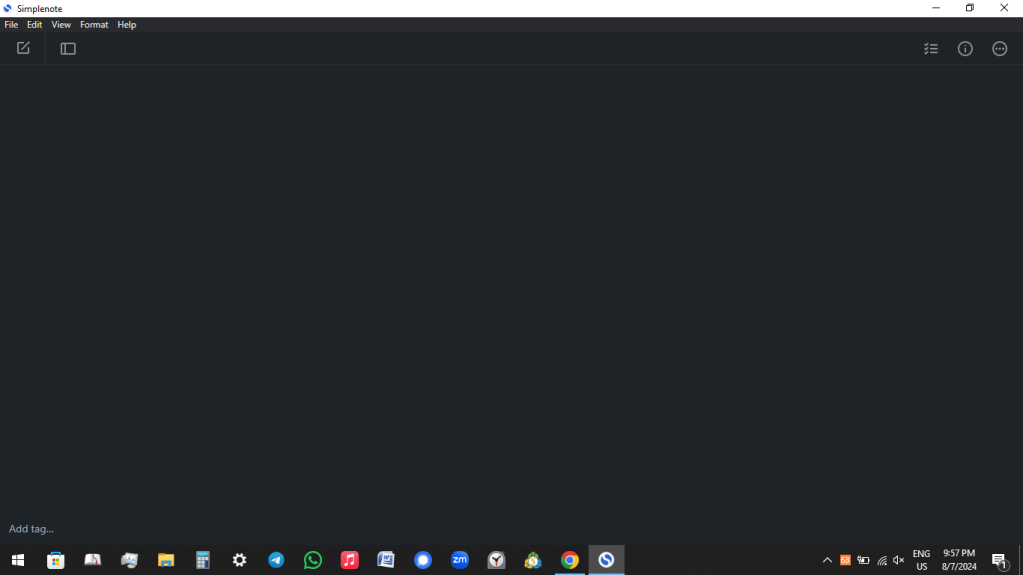
Hello. There is another issue. When we switch to dark mode. Even when the whole accent of the windows is set to dark mode, the title bar(where Simplenote is written with the logo) still appears to be light. This causes strain on eyes as there is a very bright horizontal white bar on the top. Can the dark theme on the application turn the title bar dark too?
-
Hi @as803667! We have an open issue for this. I have added your feedback to the report. Thanks!
If you have any further questions or suggestions, we recommend continuing your discussion directly on the GitHub issue here:
https://github.com/Automattic/simplenote-electron/issues/1799


 Simplenote Support Forums